

PuttingStudio sets the benchmark for high-performance golf putting studios, transforming your putting green into the ultimate environment for instruction and training. It effectively helps you master putting direction and speed, enhance your green-reading skills, and gain a deeper understanding of the interplay between pace and line in the putting process. Through interactive training drills projected directly onto the green, you can challenge yourself or compete against others in engaging games. PuttingStudio offers a virtually limitless array of practice options. It is ideally suited for the following applications:
(1) Golf instruction and training academies;
(2) Putting studios (for instruction, club fitting, etc.);
(3) Indoor golf facilities;
(4) Golf enthusiasts.
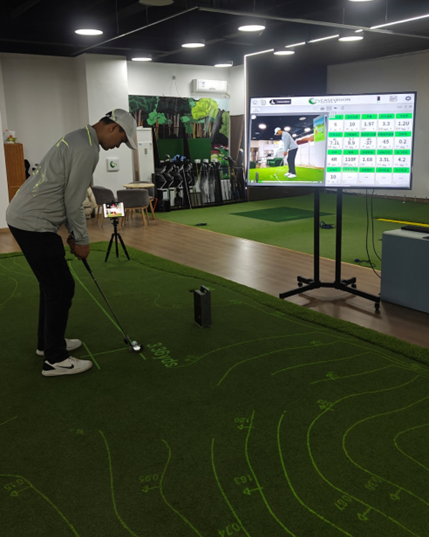
Elevate Your Putting Skills to the Next Level
PuttingStudio seamlessly integrates a variety of technologies to deliver an unparalleled putting training experience. Its features include an interactive "Smart Green" powered by AR (Augmented Reality), as well as a machine- vision-based system for tracking and analyzing ball trajectory. Furthermore, it offers comprehensive putting analytics—providing precise, detailed data on your strokes to help you quickly pinpoint the root causes of any issues. By delivering intuitive feedback in multiple formats—including video, images, data metrics, and trajectory curves—PuttingStudio leverages these advanced technological tools to analyze and refine a golfer's putting mechanics, enabling you to conduct both instruction and practice within a fully integrated, closed-loop environment.

The PuttingStudio consists of an interactive smart putting green system comprising a green, an iPad, a computer, a projector, and a camera. This system is capable of displaying the green's topography, suggesting putting lines, and visualizing the actual rolling path of the ball, among other functions. It facilitates various engaging interactive games designed to help users improve their putting technique. Centered around the iTrack system for data acquisition, it enables the precise measurement of putting rhythm, clubhead and clubface metrics, and ball data.

(1) Putting Green: Available in two configurations—flat and level, or flat with a slight incline (≤ 3%);
(2) iTrack: Detects data regarding both the ball and the putter head;
(3) Computer: The central processing and display hub;
(4) iPad: Facilitates human-computer interaction and can also serve as the camera for capturing putting stroke mechanics;
(5) Monitor: Displays test data, putting stroke videos, and other relevant information;
(6) Projector: Projects visual information onto the putting green surface;
(7) Ball Tracking Camera: Detects the ball's position and tracks its movement;
(8) Putting Stroke Camera (iPad compatible): Captures the mechanics of the putting stroke.
Advantages of Using PuttingStudio:
(1) Intelligent, Visual, Data-Driven, and Engaging: An interactive approach to instruction and training.
(2) Comprehensive Data Detection: Used for assessment, feedback, analysis, and identifying specific technical flaws.
(3) Personalized Training: Tailored training programs and practice drills customized to your individual performance.
(4) Consistency: Focus on technical mechanics within a controlled environment to develop a more consistent putting stroke.
(5) All-Weather Practice: Practice and improve your putt skills year-round, regardless of weather conditions.
(6) Fast and Efficient: Instant feedback allows for immediate adjustments, thereby enhancing instructional efficiency.
Features and Display Capabilities:
(1) On-Green Projection Display: Putting aids (including the ideal line, aim line, stance line, tracking line, contour lines, etc.); interactive games (including "Hole-in-One," "Nine-Grid," "Target Shooting," "Random Target," "Maze," and "Challenge Space"); and other interactive elements.

(2) iTrack Putting Data;

(3) Putting Videos: Putting Videos, Player Management;

(4) 3D Clubhead Motion Diagram: Displays the 3D trajectory of the clubhead and the orientation changes of the clubface.

(5) Process Curves: e.g., putting tempo, clubhead speed, clubface angle, and 10 other types of process curves:

Putting Rhythm Curve

Putt Club Speed Curve

Attack Angle Curve

Putt Club head Path Curve

Putt face point Curve

Ball Speed Curve

Ball Rifle Spin Curve

Ball Side Spin Curve

Ball Forward/Backward Spin

Ball Launch Video

Ball Launch Image

Ball Trajectory

Club Head Moving Image
Download
Puttingstudio User Manual
Download
