

The iTrack golf launch monitor utilizes high-speed camera technology, advanced image processing algorithms, and high-speed processing hardware. It is both powerful and portable. It reliably, in real time, and accurately measures various motion data from the launch of the ball during shots with woods, irons, and putters, as well as the movement of the clubhead and clubface at impact. This single device provides data on all types of shots from the swing to putting. The iTrack is an essential instrument for golf instruction and training, simulators, and fitting.
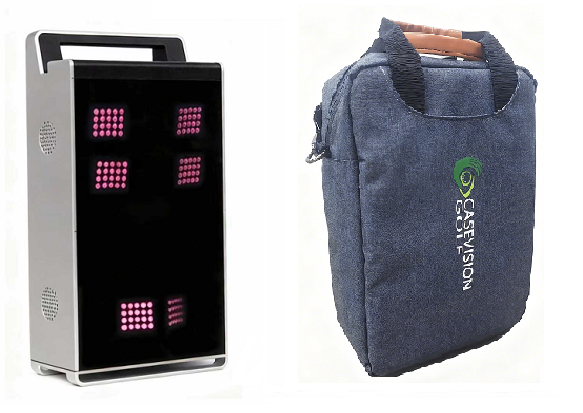
What data can iTrack measure?
Swing Data:
● Ball launch data: ball speed, launch angle, launch direction angle, spin (total spin/spin axis, or backspin/sidespin), shoot video.
● Ball flight trajectory: carry, roll distance, landing offset, flight height, landing angle, and flight time.
● Club head data: club head speed, attack angle, club head path, and smash factor.
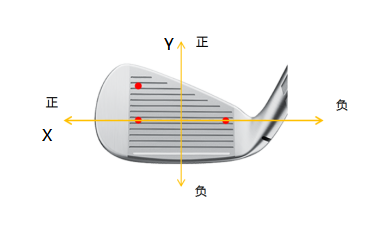
● Club face data: face angle, dynamic loft, lie angle, closing speed, and impact point location (X/Y coordinates: X is the horizontal axis, positive values: from the center to the toe; negative values: from the center to the heel. Y is the vertical axis, positive values: from the center to the top, negative values: from the center the bottom).
● Slow playback of club head movement video before and after impact.
Putting data:
● Swing tempo: Backswing time, downswing time, backswing length, follow-through length, tempo.
● Club head data: Club head speed, attack angle, club head path, smash factor, club trail.
● Club face data: face angle, dynamic loft, lie angle, twist angle, closing speed, impact point location (X: from the center of the club face to the toe, data is positive, from the center of the club face to the heel, data is negative)
● Ball launch data: Ball speed, launch angle, direction angle, spin (sidespin, backspin, roll), shoot video,launch image.
● Ball roll data: total distance, approach speed, and total offset(manually set green speed and no slope)
Application
1. View Launch Data
(1)iTrack + iPad (iPhone):
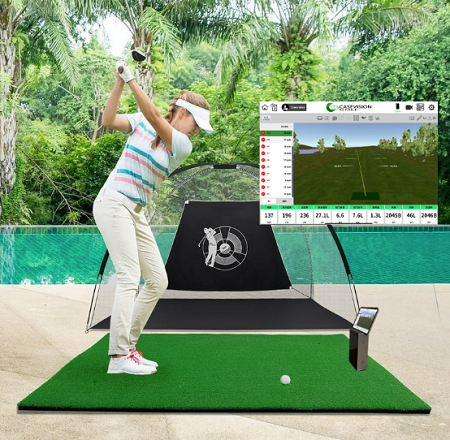
View shot data, trajectory, etc. on your iPad (or iPhone).
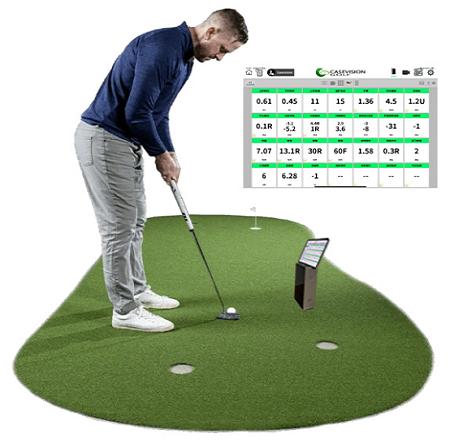
View Putting data, curves, etc. on your iPad (or iPhone).
(2)iTrack + Monitor:
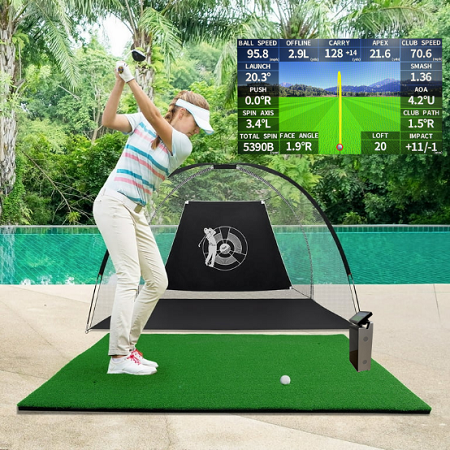
iTrack has a standard HDMI display output interface, allowing you to connect an external monitor to view swing data and curves.
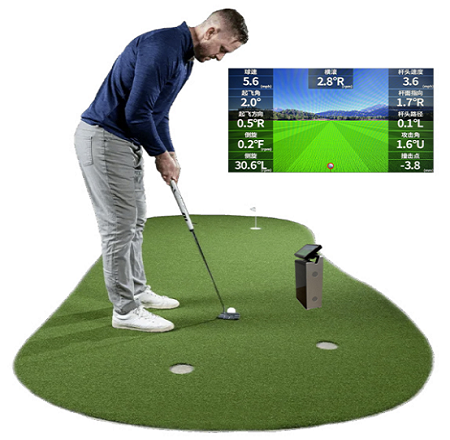
iTrack has a standard HDMI display output interface, allowing you to connect an external monitor to view Putting and curves.
(3)iTrack + Monitor + iPad (iPhone):
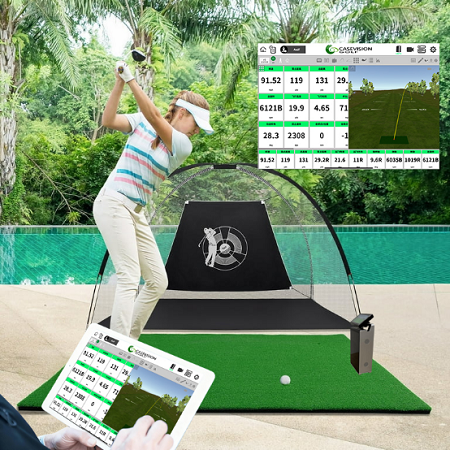
Coaches can use iPads (iPhones) to view swing data and various curves.
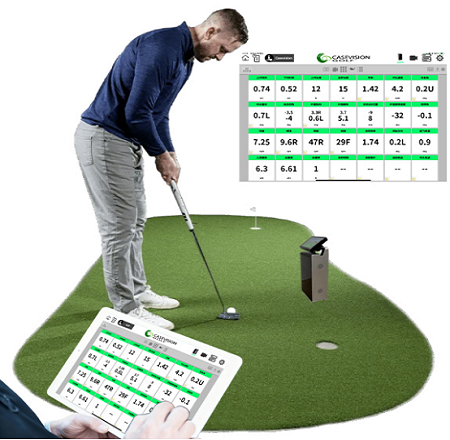
Coaches can use iPads (iPhones) to view putting data and various curves.
2. View shot data and Swing Video
(1)iTrack + iPad (iPhone):

You can use your iPad (or iPhone) camera to capture your golf swing. On this iPad (or iPhone), you can not only view the swing data but also swing motion view playback, and it also has AI swing analysis capabilities
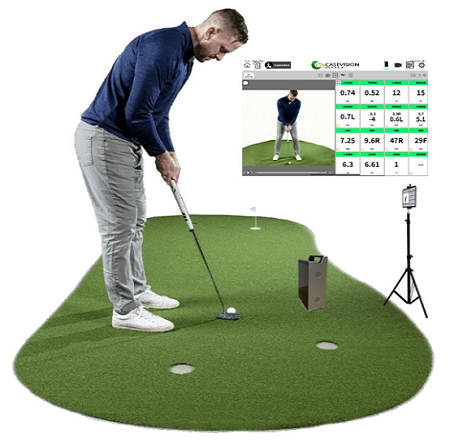
You can use your iPad (or iPhone) camera to capture the putting motion. On this iPad (or iPhone), you can not only view putting data but also view putting video.
(2)iTrack + iPad(iPhone) + iPad(iPhone):
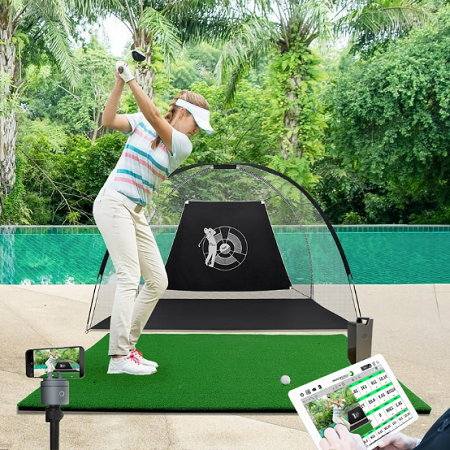
Use an iPhone (or iPad) as a camera to capture the golf swing. This way, the coach can view swing video playback and data on the iPad (or iPhone) and move around freely with the iPad.
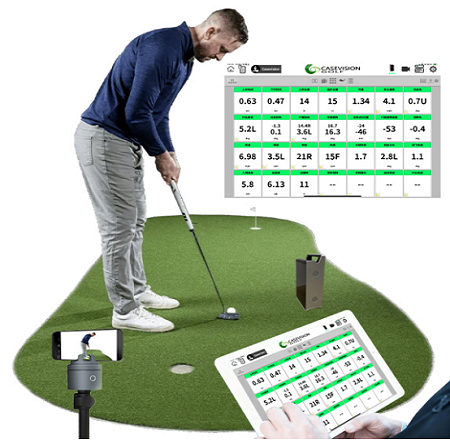
Use an iPhone (or iPad) as a camera to capture the putting motion. This way, the coach can view putting video and data on the iPad (or iPhone) and move around freely with the iPad.
3. Golf simulator
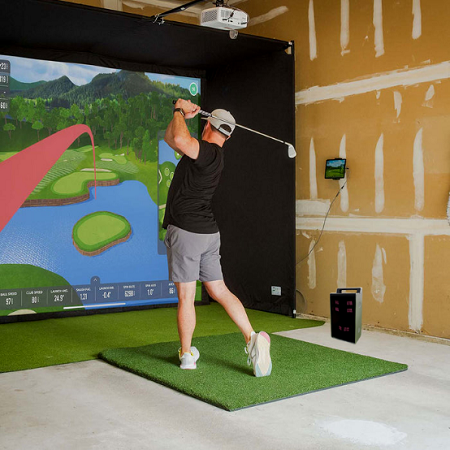
By connecting iTrack to the simulator computer via the network, golf simulation functionality can be achieved, iTrack is currently compatible with E6 APEX, GSPro, Creative Golf Advanced, KGolf, MiniBay Golf and others. It is also compatible with other brands of simulator software, but communication protocols need to be discussed with the simulator software.
4. Golf fitting

iTrack offers comprehensive and accurate ball, clubhead, and clubface data, along with statistical data and process curves, making it suitable for fitting various types of golf clubs.
Detection Area
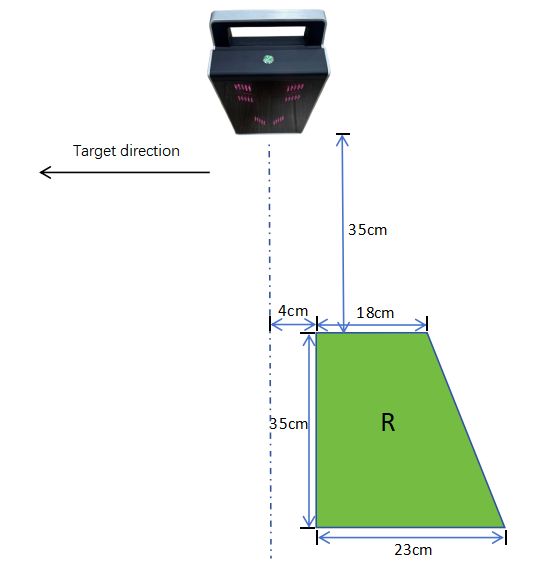
iTrack supports both left- and right-handed mode. Simply place the ball in the designated putting area.
(1)Right-handed Mode
(2)Left-handed Mode
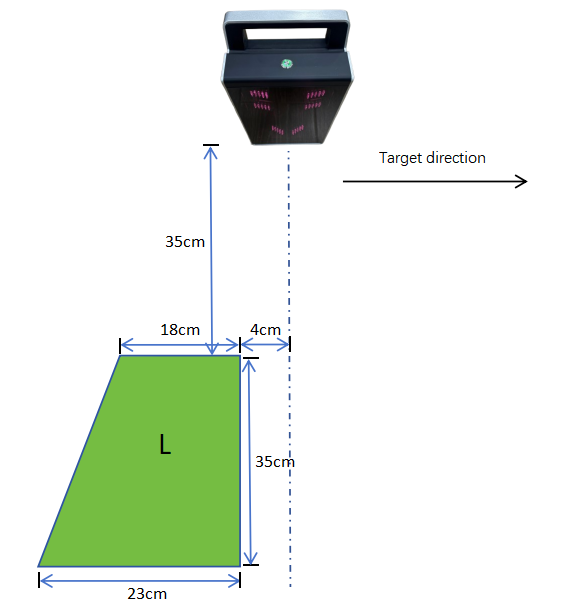
● The ball must be within a vertical distance of 35-70cm from the device.
● The effective detection area is a rectangular trapezoid with a top side of 18cm, a bottom side of 23cm, and a height of 35cm.
(3)Putting Mode
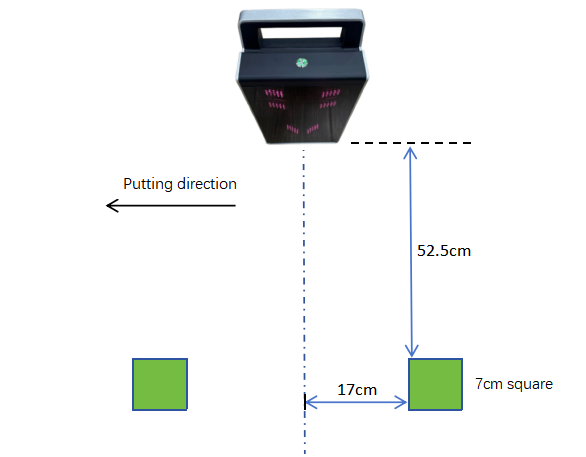
● The ball must be within a vertical distance of 52.5-59.5cm from the device.
● The effective detection area is a square with a side length of 7cm.
MARK
Note: When measuring ball data, no marks are required on the ball or club face. Markings are only required when measuring club head and face data or when working in putting mode.
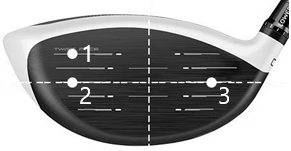
WOODS and IRONS:
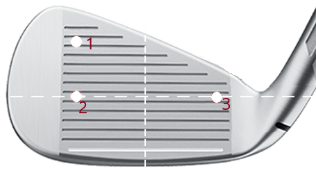
You need to put three marks on the club face. For wood clubs, the marks are: one mark at the toe and one at the heel on the center line of the club face (2, 3), and one mark on the top of the club face (1). The line connecting 1 and 2 is perpendicular to the line connecting 2 and 3.
Putter:
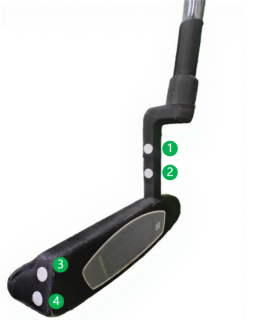
Four marks need to be placed on the clubhead and shaft: ① and ② are the two markings on the clubhead neck, and ③ and ④ are the two markings on the clubhead head. These four markings represent the plane of the putter face, so it's best to have them on the one plane. The distance between ① and ② is two marks wide, and the distance between ③ and ④ is one mark wide.
Ball:
A mark ball isn't needed during a swing. It's only used when iTrack is in putting mode, for more accurate measurement. Use a non-reflective marker pen to randomly mark the ball with circular marks. The diameter of the marking circles should be approximately 5mm. The marking circles should be evenly spaced randomly, not symmetrically. A minimum of three marking points is recommended. Three marking points should not form an equilateral triangle, and four marking points should not form a square. If fewer marking points are used, they should be oriented toward iTrack.

Key and Interface
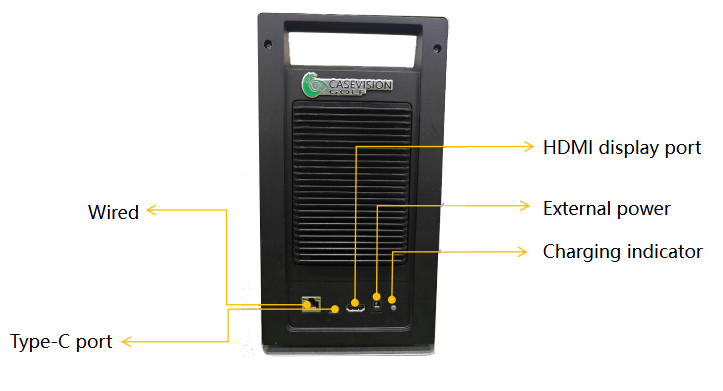
● On/Off button.
● Network:
■ Wireless: Dual wireless cards, one serving as a wireless hotspot, the other as a wireless card for internet access. Connecting a mobile device to the iTrack hotspot does not interrupt the mobile device's internet connection.
■ Wired: 1000M/100M Ethernet.
● Type-C port: USB 2.0, allows the iTrack to function as a USB device and interact with computers.
● HDMI display port.
● External power/charging power: DC: 15-12V/4A.
● Charging indicator: Red - Charging; Green - Charging complete; Alternating red and green - Charging failure.
Other Specifications
● Supports indoor and outdoor operation;
● Supports both artificial mats and natural turf;
● Battery capacity: 5800mAh, operating time: approximately 2 hours;
● Mechanical dimensions and weight: 15cm long, 8cm wide, 28cm high, approximately 1900g;
● Operating temperature range: -10°C to 45°C;
● CE certified.
APP for iTrack
CaseVision Golf
CaseVision Golf app, which is for iTrack, covers golf swing and putting training. It's a powerful tool for golf coaches, helping them quickly implement digital and intelligent golf instruction. It's also a valuable training aid for golfers, enabling closed-loop training with feedback. Through video, data, and graphs, it provides comprehensive, real-time, and synchronous feedback on the golf swing and putting, helping players quickly and efficiently optimize and correct their swing and putting movements and errors.

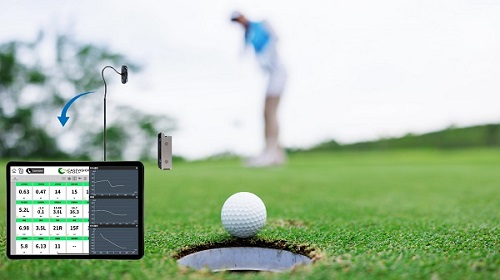
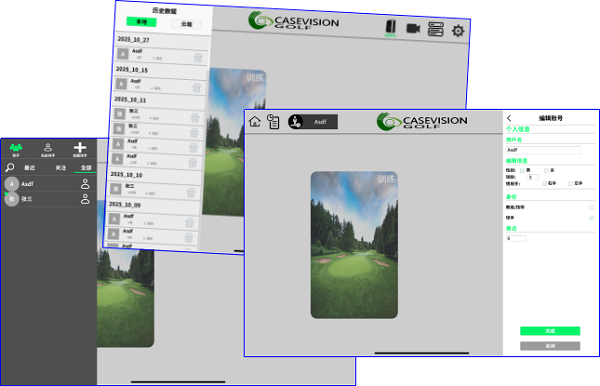
(1)Supports registration and login for both coaches and players, providing coaches with the ability to manage their students. All data (including videos) can be stored locally or in the cloud.
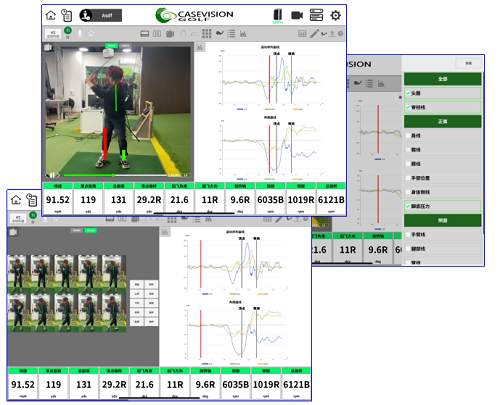
(2)AI swing video capture and analysis function. Use the mobile device (iPad, iPhone)'s own camera to capture the swing (putting) video, and use AI technology to realize the recognition of key swing positions, intelligent line drawing analysis, swing plane, foot pressure maps, Kinematic-Sequence and other functions.
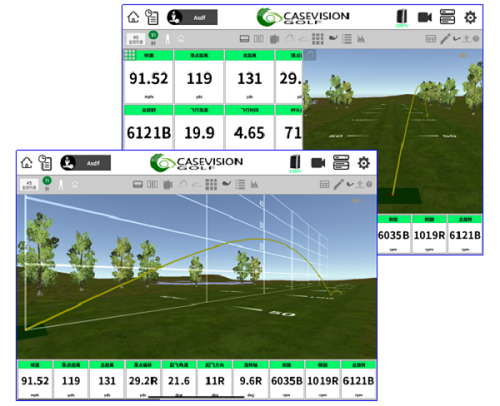
(3)Receive and display swing data detected by iTrack. This includes ball launch data (ball speed, launch angle, direction angle, backspin, sidespin, total rotation, axis angle), club face data at impact (face angle, dynamic loft, lie angle close speed impact position), club head data (club head speed, club head path, attack angle, smash factor), and flight parameters (trajectory data, carry, rolling distance, landing point deviation from target distance, maximum flight height, flight time, landing angle). 2D and 3D trajectory display.
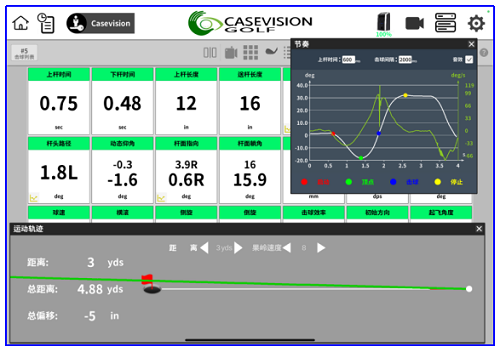
(4)Receive and display iTrack-detected putting data, including video of the putting, putting rhythm data (upswing time, downswing time, length of the stroke, rhythm), club head data (club head speed, attack angle, club head path angle, smash factor), club face data (dynamic loft, club face pointing angle, lie angle, impact point, club face rotation, club face twist before and after impact), ball launch data (ball speed, spin, impact efficiency, launch direction angle, launch angle), and calculate ball trajectory data (total distance, speed distance to the hole, total offset, lateral offset) on a green with configurable parameters (speed, slope, distance from the hole).
(5)Download
Search CaseVision Golf in the Apple App Store.
CasevisionCamera
The CasevisionCamera APP is used in conjunction with the CaseVision Golf APP. It provides the CaseVision Golf APP with the function of capturing swing videos and transmits the captured swing (putting) videos to the CaseVision Golf APP, so that the mobile device running the CaseVision Golf APP can move freely.

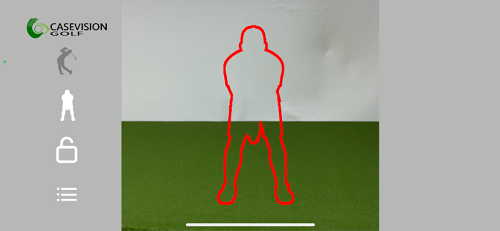
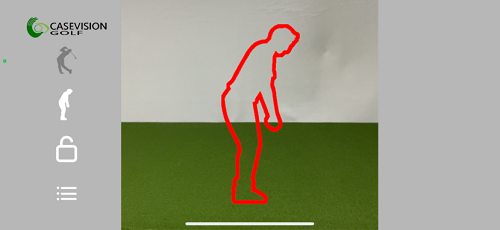
Search Casevision Camera in the Apple App Store.
Download
Golf Swing Parameter Guide
Download

Putting Parameter Guide
Download
CasevisioGolf APK
Download
CasevisionCamera APK
Download
CaseVision Golf App Quick Guide
Download
CaseVisionCamera APP Quick Guide
Download
iTrack and GCQ vs. trackman comparison Test
Download