

How to choose a projector for your golf simulator?

iTrack supports multiple golf simulator software, especially popular and well-known simulators from Europe and America. This allows users to switch from the current all-inclusive installation model to the internationally popular DIY model. This DIY model has the following advantages:
(1)You can choose your preferred golf simulator software. These professional companies have standardized software development and management, continuous update capabilities, professional service, and guaranteed quality.
(2)Most golf simulator software is available through subscription fees. With the DIY option, users can easily switch simulators if they don't like the one they prefer or want to change it. If you switch after your subscription expires, there will be no loss.
Therefore, DIY mode will be more popular among golf enthusiasts.
Especially using iTrack to DIY golf simulator will bring you the following benefits:
(1)iTrack has low data latency, resulting in a more realistic experience.
(2)iTrack has high data accuracy, making the simulation more accurate. Precise ball trajectories allow you to hit exactly what you want, increasing the realism and competitive feel.
(3)iTrack has comprehensive data, fully meeting the needs of golf teaching, training, and fitting.
(4)iTrack already supports many internationally popular simulator software brands and will definitely cooperate with more simulator software companies in the future.
When DIY golf simulator, you need to choose a suitable projector. A suitable projector will make the golf simulator screen clearer and smoother, providing a more realistic golf course experience.
Factors to Consider When Choosing a Projector
When choosing a projector, consider the following factors:
(1)Space Size: Short-throw projectors are ideal for smaller spaces; standard-throw projectors are suitable for larger rooms. This will be discussed in detail later.
(2)Resolution: Full HD resolution is sufficient for most golfers, while 4K resolution can present stunning details on the course. However, the ability to perfectly display high-resolution images also depends on ambient light and projector brightness.
(3)Brightness: Higher lumens mean a clearer image even in rooms with ambient light. If the room is dimly lit, choose a projector with lower brightness; if the room is bright and cannot be controlled, choose a projector with high brightness (greater than 5000 lumens).
(4)Light Source: Laser light sources have a longer lifespan and lower maintenance costs than traditional bulbs.
(5)Golf Mode: Projectors are specifically optimized for golf simulator applications, such as color settings that make the greens, sky, and fairways look more realistic.
(6)Projector Brands: Projector brands and reviews can be found online, especially online store reviews. Epson, BenQ, LG, Optoma, ViewSonic... Based on the available space, we determine the screen size and aspect ratio, and then select a projector with a specific throw ratio so that the projected image perfectly covers the entire screen.
Based on the available space, we determine the screen size and aspect ratio, and then select a projector with a specific throw ratio so that the projected image perfectly covers the entire screen.
A crucial projector parameter is focal length. To more intuitively illustrate its impact on the image, we use another concept: throw ratio. Essentially, throw ratio and focal length are the same concept. The relationship between the projector distance from the screen (throw distance) and the screen width (screen width) is as follows:
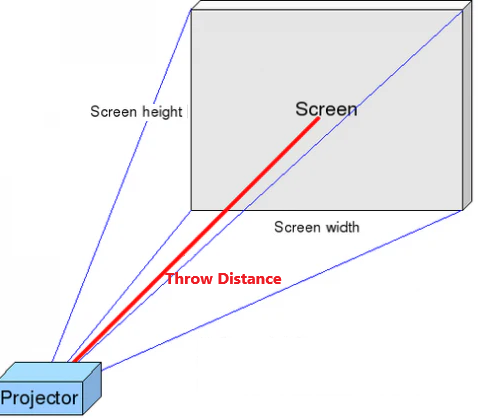
Throw Distance = Throw Ratio x Screen Width
By now, you should have a general idea of what kind of projector you want. Based on your desired brand, resolution, brightness, light source, and other parameters, you can basically determine a projector model. Then, carefully check its manual, which usually provides the accurate correspondence between projection distance and image size. This will help you determine if the projector is suitable. Below are the parameters of a certain projector.
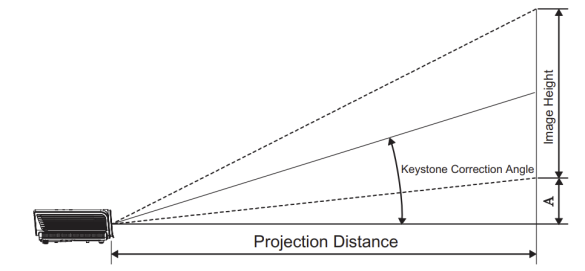
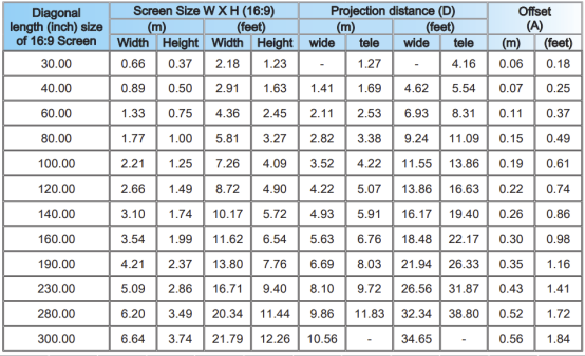
Practical Application
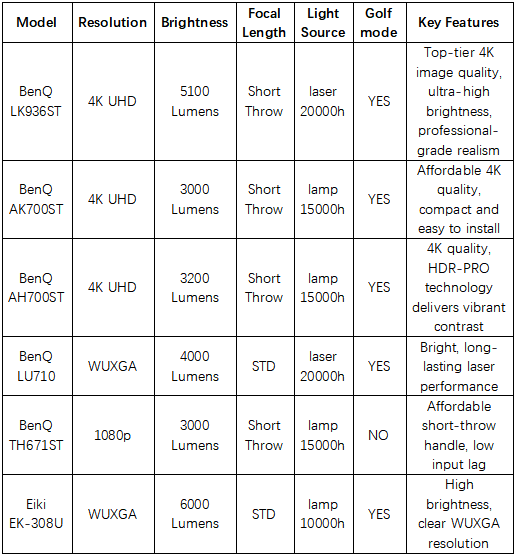
A Comparison of Some Projector Performance
Quick Recommendations
(1)For the most realistic and high-end experience: Choose the BenQ LK936ST – 4K Ultra HD resolution, ultra-bright laser, and flexible short-throw projection.
(2)For a great 4K experience in a smaller room without breaking the bank: The BenQ AK700ST or AH700ST offer excellent cost-performance ratio.
(3)For bright and reliable laser performance in a larger space: The BenQ LU710 is an excellent WUXGA resolution option.
(4)For those with a limited budget and small space: The BenQ TH671ST delivers clear Full HD visuals and fast response.
(5)For large rooms with a limited budget but requiring high brightness: The Eiki EK-308U provides clear WUXGA visuals.